Tables
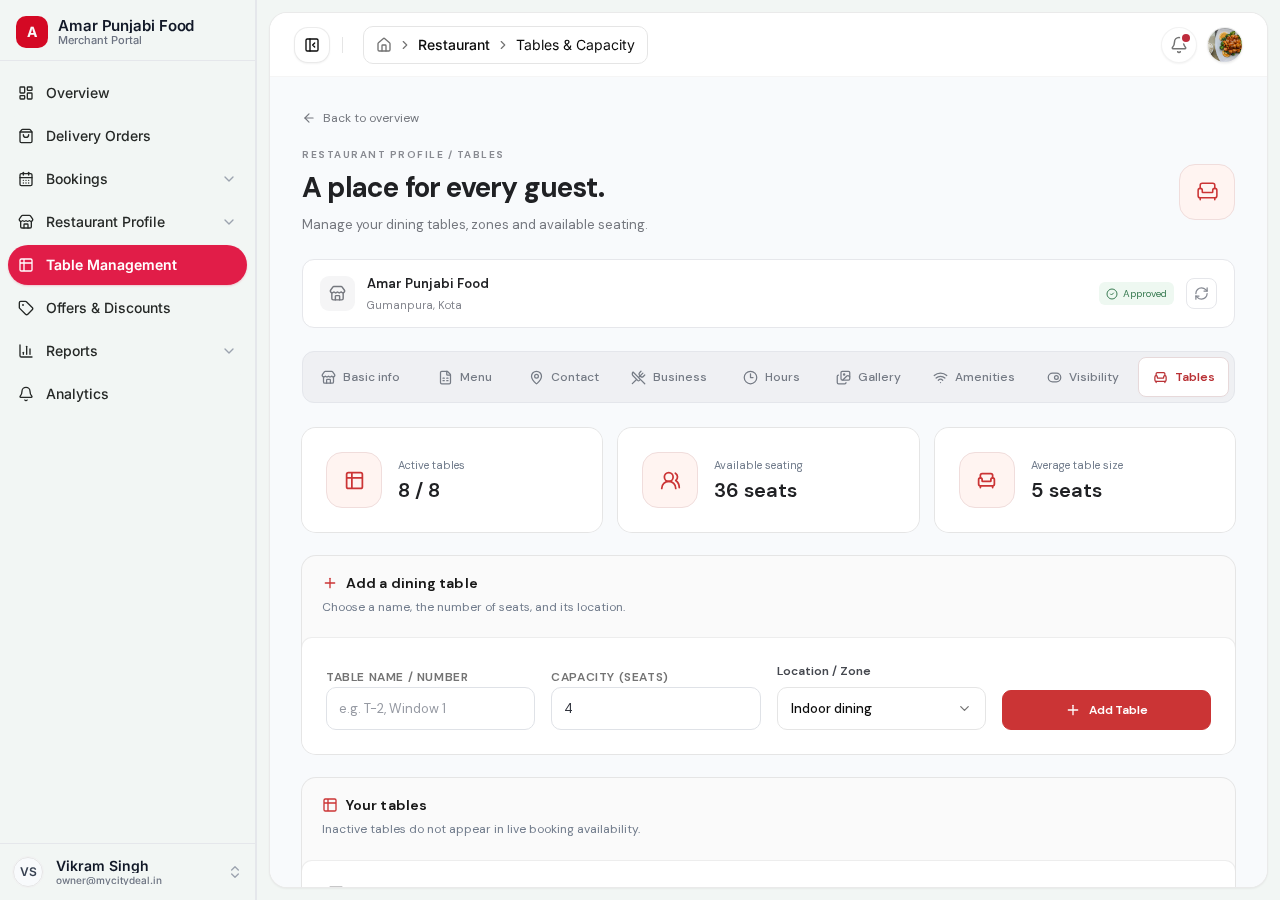
This is the last sub-page in your profile setup. Here you add your physical tables so customers can book specific seats.
Why Tables Matter
When customers search for a slot, they don't just see "any available time" — they see "an available table for N people at time X". This is how we avoid overbooking.
By adding your tables to MyCityDeal:
- You never get double-booked
- Customers know exactly which table they'll get
- You can manage sections (e.g., "Rooftop only", "Private room")
What You'll Add
For each table:
| Field | Required | Example | Notes |
|---|---|---|---|
| Table number | Yes | T1, Patio-3, Window-2 |
Any unique identifier |
| Capacity (max seats) | Yes | 4 |
Maximum number of guests |
| Min capacity | Auto | 2 |
Defaults to Math.ceil(capacity / 2) |
| Location / Zone | Yes | INDOOR, OUTDOOR, ROOFTOP, PRIVATE_DINING |
For grouping |
| Active | Yes | ON | Whether this table can be booked |
Zone / Location Options
| Zone | Use for |
|---|---|
| INDOOR | Main dining room |
| OUTDOOR | Patio, balcony, terrace |
| ROOFTOP | Rooftop seating |
| PRIVATE_DINING | Private rooms, party halls |
Customers can filter by zone if they have a preference.
How to Add a Table
- Fill in the form on the left side of the page:
- Table number (any name, must be unique)
- Capacity (max seats, e.g.,
4for a 4-seater) - Zone (INDOOR / OUTDOOR / etc.)
- Click "Add table"
- The new table appears in the list on the right
Editing and Removing
- Edit — Click on a table row, modify fields, save
- Remove — Click the trash icon, confirm
- Toggle Active — Quickly disable a table without deleting (useful when a section is closed for cleaning)
Recommended Setup
For a typical 80-seat restaurant:
| Zone | Tables | Capacity |
|---|---|---|
| INDOOR | 12 tables | 4 seats each (48 total) |
| INDOOR | 2 tables | 8 seats each (16 seats) |
| OUTDOOR | 4 tables | 4 seats each (16 seats) |
Total: 18 tables, 80 seats
Common Patterns
Multi-purpose Tables
If your tables can be combined (push two 4-seaters together for an 8-top), add them as separate tables. The system handles combined seating automatically.
Variable Capacity
If your table can seat anywhere from 2 to 6 people:
- Capacity: 6
- Min capacity: 2
Customers can book with party sizes between 2 and 6.
Saving
Click "Save" after adding or editing tables.
You're Done With Profile Setup!
Congratulations! Once you have:
- ✅ Saved Basic Info
- ✅ Added menu items
- ✅ Set contact info
- ✅ Set business details
- ✅ Set operating hours
- ✅ Uploaded gallery photos
- ✅ Marked amenities
- ✅ Set status to your preference
- ✅ Added tables
Your restaurant is ready to be reviewed by the admin team.
Head to Approval Process in the sidebar to learn what happens next.
Ready to grow your restaurant?
Join 50+ restaurants on MyCityDeal and start receiving bookings today.