Your Dashboard Tour
Once you log in for the first time, you arrive at your Restaurant Dashboard — your home base. This is where you'll spend most of your time managing your restaurant.
The Dashboard Overview
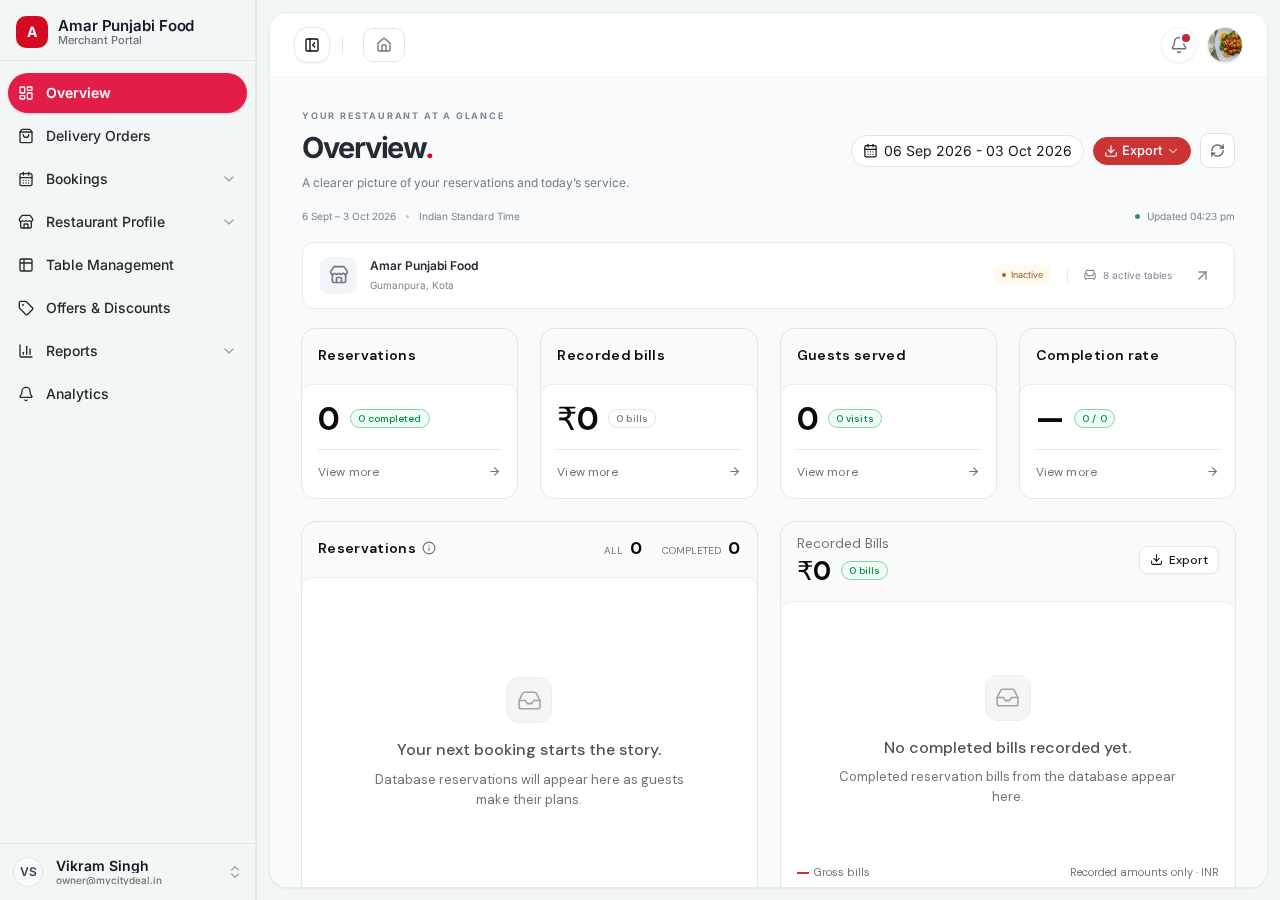
Notice the left sidebar with these main sections:
| Icon | Section | What it's for |
|---|---|---|
| 🟥 | Overview | Today's snapshot (you're here now) |
| 📦 | Delivery Orders | Customer orders for delivery |
| 📅 | Bookings | All table reservations |
| 🏪 | Restaurant Profile | Your listing details (9 sub-pages!) |
| 🪑 | Table Management | Your physical tables |
| 🎟️ | Offers & Discounts | Coupons you create |
| 📊 | Reports | Downloadable CSV reports |
| 📈 | Analytics | Visual charts |
The top of the page shows:
- 🍽️ Your restaurant name (yours will show once you save your profile)
- 🟢 Status badge —
Approvedwhen live,Inactiveif paused - 📅 Date range picker (default = last 30 days)
- 🔔 Bell icon for new notifications
- 👤 Your name in the bottom-left (click to sign out)
The 4 Metric Tiles
Right in the center, four big cards give you the most important numbers:
| Card | What it shows |
|---|---|
| Reservations | Total bookings in the date range + how many you completed |
| Recorded bills | Total revenue from confirmed bookings |
| Guests served | Total unique customers |
| Completion rate | % of bookings you completed vs cancelled |
These are the numbers to glance at every morning to see how your restaurant is doing.
The "Your Restaurant" Card
Just below the heading, you see a card showing:
- Your restaurant name
- City + locality
- Approval status (
Approved= live,Pending= waiting for review) - Number of active tables
If your restaurant hasn't been set up yet, this card shows "Your restaurant" with a "Set up now" button.
Next: Set Up Your Profile
Now that you know your way around the dashboard, head to the next page to set up your restaurant profile. This is where you'll spend your first hour on MyCityDeal.
Ready to grow your restaurant?
Join 50+ restaurants on MyCityDeal and start receiving bookings today.