Gallery & Menu Photos
Visual content is what makes customers choose your restaurant over competitors. Use this sub-page to upload your best photos.
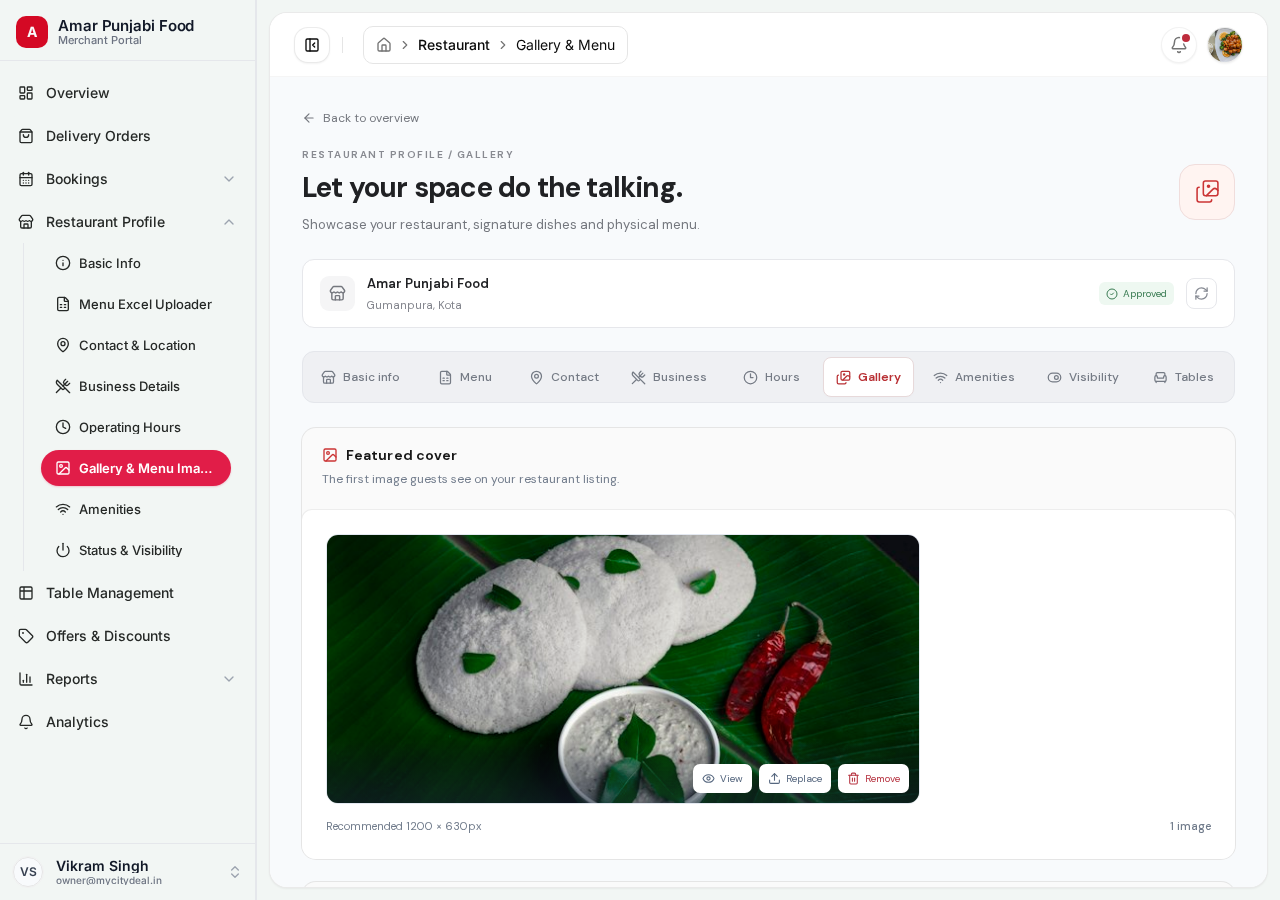
Three Types of Images
1. Cover Image
The hero image shown on:
- Your listing card in search results
- The header of your detail page
Recommended size: 1200 × 630 px (landscape) Format: JPG, PNG, or WebP Max size: 8MB
Pick an image that:
- Shows your best angle (exterior, dining room, signature dish)
- Has good lighting
- Doesn't have text overlays or watermarks
2. Gallery Images
Multiple images that customers can swipe through on your detail page. Show:
- Interior shots (dining room, bar, outdoor seating)
- Signature dishes
- Chef at the desk
- Special features (dish presentation, ambience)
Format: JPG, PNG, or WebP Max size: 8MB per image Quantity: Upload as many as you want (we recommend at least 3-5)
3. Menu Photos
Photos of your physical menu pages (paper menu, board menu, etc.).
Why upload these?
- Customers can see your full menu before visiting
- Helps with pre-ordering for delivery
- Shows customers you have variety
Tip: Make sure the photos are clear and readable. Blurry menu photos frustrate customers.
How to Upload
- Click the upload area for the image type you want
- Select one or more files (JPG/PNG/WebP, max 8MB each)
- Files upload one by one — you'll see a progress indicator
- Once done, the new images appear in your gallery
Note: Image uploads save immediately. You don't need to click a "Save" button.
Replacing an Image
To replace a cover image or remove an image:
- Find the image you want to replace
- Click "Replace" (for cover) or "Remove" (for any image)
- Confirm the action
- Upload the new file (for replace)
Best Practices
- ✅ Take photos in good lighting — natural light works best
- ✅ Use a real camera or modern phone — not grainy old photos
- ✅ Show variety — interior, food, atmosphere, signature items
- ✅ Update seasonally — replace winter menu photos with summer specials
- ❌ Avoid heavy filters, text overlays, or watermarks
- ❌ Don't upload stock photos — customers can tell
Saving
No save button needed — uploads save immediately.
Next
Head to Amenities to mark facilities you offer.
Ready to grow your restaurant?
Join 50+ restaurants on MyCityDeal and start receiving bookings today.