Status & Visibility
This sub-page controls whether your restaurant is visible to customers and whether you accept bookings. Use it for vacations, renovations, or seasonal closures.
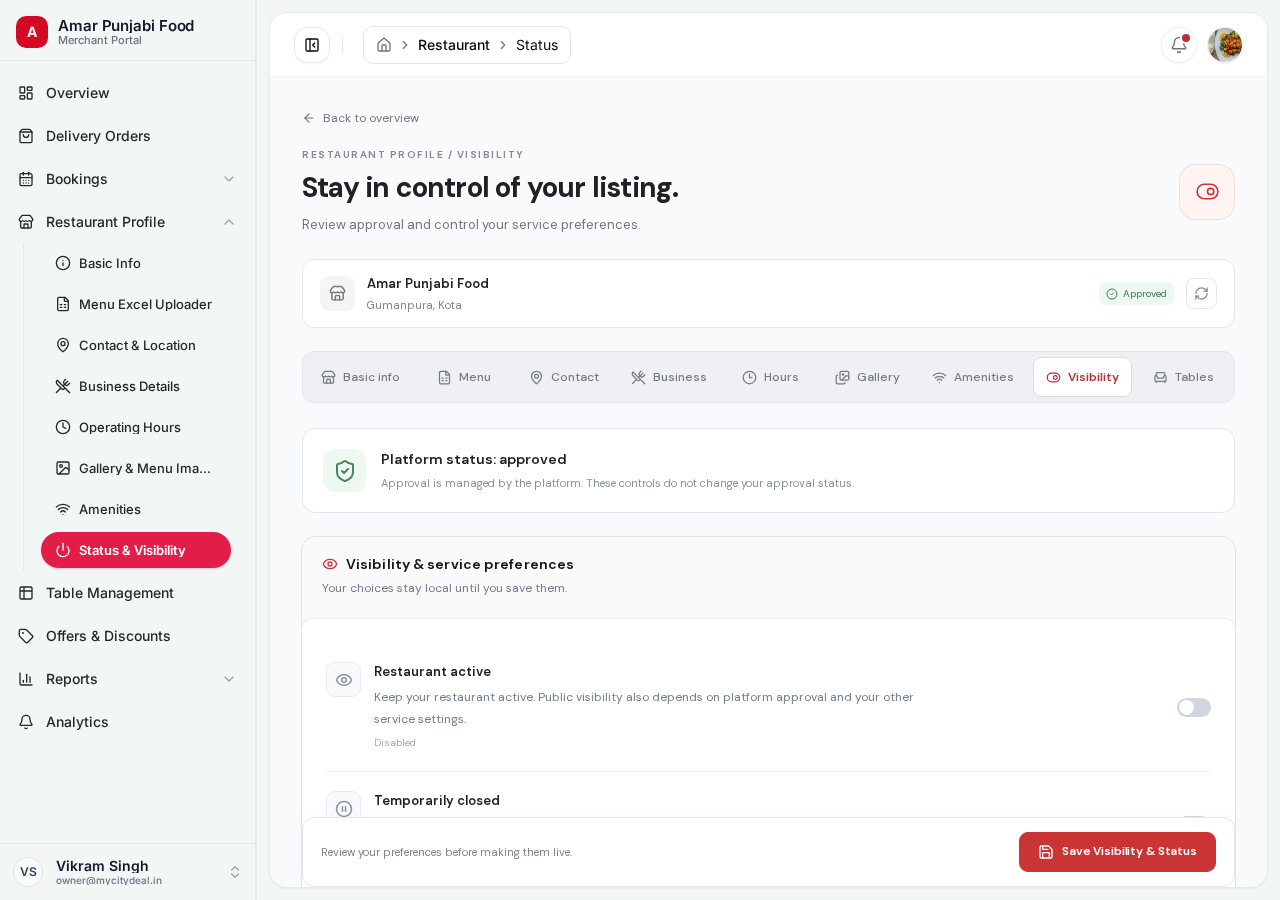
The Big Status Display
At the top of the page, you'll see your Platform Approval Status:
Approved(green) — You're live and accepting customersPending(yellow) — Waiting for admin reviewRejected(red) — Application was deniedSuspended(red) — Temporarily blocked by us for policy violation
You can NOT change this status here. It's managed by the platform admin team.
Five Toggle Switches
Below the status, you have five toggles:
| Toggle | Default | What it does |
|---|---|---|
| Restaurant active | ON | Master switch — your restaurant appears anywhere |
| Temporarily closed | OFF | Mark a short pause without removing your profile |
| Accept bookings | ON | Whether customers can book tables |
| Accept online food orders | ON | Delivery and takeaway orders from customers |
| Featured listing | OFF | Premium placement (paid feature) |
Restaurant Active
Master visibility toggle. If OFF:
- Your restaurant doesn't appear in any search
- Your detail page shows "Currently unavailable"
- New bookings are blocked
Use this when:
- You're permanently shutting down (contact support to actually delete)
- You want to hide temporarily without losing profile
Temporarily Closed
Different from "Restaurant active". When ON:
- Your listing shows a "Temporarily Closed" badge
- New bookings are blocked
- Existing bookings are honored (we don't auto-cancel)
Use this when:
- You're on vacation
- Renovating for a few days
- Closed for a private event
- Seasonal closure
Turn back OFF when you reopen.
Accept Bookings
Toggles whether customers can book tables via MyCityDeal. When OFF:
- Customers can still see your profile and menu
- They just can't book a reservation
- Useful if you're fully booked for a while
Accept Online Food Orders
One switch for both fulfilments: food orders for delivery and for takeaway. When it is OFF, customers see "Ordering is paused at this restaurant" and the restaurant is not listed under online ordering anywhere.
The switch alone is not enough. A restaurant with no available dish on its menu has nothing to cook, so customers still see it as closed for online orders — the note under the switch tells you how many dishes are available right now.
| Menu state | What customers see |
|---|---|
| Switch ON, at least one available dish | Can order for delivery or takeaway |
| Switch ON, menu empty (or every dish marked unavailable) | Not listed under online ordering; detail page says ordering is paused |
| Switch OFF | Not listed, even with a full menu |
Use it OFF when:
- The kitchen is closed for the evening but the dining room is still open
- You are on a holiday and cannot prepare orders
- You only want table bookings for now
Adding or making one dish available takes effect immediately — nothing to save here.
Featured Listing
Premium placement — your restaurant appears at the top of search results with a special badge. This is a paid feature. Contact sales@mycitydeal.com to enable it.
Delivery Distance and Fee
Below the switches is a small card with three fields. It controls what customers are charged for delivery — the distance itself is measured by the platform, you only set the rule.
| Field | Default | What it does |
|---|---|---|
| Free delivery up to (km) | 0 | Orders at or under this distance pay nothing for delivery |
| Charge per km beyond that (Rs) | 0 | Rate applied to the kilometres past the free radius |
| Refuse orders beyond (km) | empty | Optional hard limit; farther addresses cannot order |
Leave the rate at 0 and nothing changes for you or your customers: every delivery keeps the flat
fee the platform has always used. Set a rate and the rule takes over, for example free up to 5 km
at Rs 10/km means a 4 km order is free and a 7 km order pays Rs 20 (the customer sees ₹70 struck
through next to ₹20, so the free part is visible as a saving, not a rumour).
The limit is enforced before an order reaches you: if the measured distance is beyond it, the customer is told the restaurant does not deliver that far and nothing is booked. Distances are calculated from your kitchen's pin, or from the centre of your area when there is no pin yet — so a pin in Contact & Location makes every fee exact.
The full rule, including why the estimate is what it is, is written up in How Delivery Fees Are Calculated.
Saving
Everything on this page — the five switches and the three delivery distance fields — is saved by the single "Save Visibility, Orders & Delivery" button in the bar at the bottom. There is deliberately no separate save for delivery pricing: two save buttons on one screen is how half a change gets left behind.
Nothing goes live while you are typing, and a toast tells you the outcome:
- Saved — "Visibility, orders and delivery pricing are live."
- Check the delivery distances — free radius over 200 km, a rate over Rs 1,000 per km, or a limit over 500 km. Nothing was written.
- Check the delivery limit — the limit is nearer than your own free radius, which would refuse every free order. Nothing was written.
- Couldn't save your settings — the platform refused it, with its reason in the toast. Try again; your page still holds what you typed.
What's the difference between "Inactive" and "Temporarily Closed"?
| Setting | Effect on listing | Effect on bookings |
|---|---|---|
| Restaurant active: OFF | Hidden from search | Blocked |
| Temporarily closed: ON | Visible with badge | Blocked |
For most cases, use "Temporarily closed" — your customers can still find you and know you're coming back. Use "Restaurant active: OFF" only for permanent removal.
Next
Head to Tables to set up your physical tables.
Ready to grow your restaurant?
Join 50+ restaurants on MyCityDeal and start receiving bookings today.